It's Friday night and the work reports from the plant shutdown are still in the van's glovebox: one with overtime not separated from public holiday hours, another with a subsistence allowance nobody can tie to a job. A work report template for an industrial contractor records, for each worker and each job, the normal, overtime and public holiday hours, night work, subsistence allowances, mileage and the day's absences. Below you will find the table of fields, when to use one report per person and when a crew sheet, how it all reaches costing and payroll, and what changes from 24/10/2026 if your people work with asbestos.
What fields a plant work report template should include
Every box on the report ends up somewhere: in the cost of the job, in the month's payroll variables or in absence control.
| Field | What to record | Where it ends up |
|---|---|---|
| Date and worker | The day and who worked | Days and absences for the month |
| Job | The job or order code each hour is charged to | Cost and progress of that job |
| Normal hours | Standard working day hours on that job | Job cost |
| Overtime and public holiday hours | Each type in its own box | Payroll variables and real cost of the shutdown |
| Night work | Hours on the night shift | Night work supplement in payroll |
| Subsistence allowances | Whether an allowance applied and on which job | Travel cost |
| Mileage | The kilometres driven for that job | Mileage charged to the job |
| Holiday, medical appointment, illness or leave | The type of absence | So that the month's days add up |
| Team leader's approval | Who signs the report off | Review before it is processed |
The rule that is hardest to keep: no line without an assigned job. An hour with no job becomes general overhead and no longer tells you whether that contract made money. If your reports currently arrive on paper and someone types them up in the office, you will find ideas for stopping that in how to digitise paper work reports.
Work report templates: per worker or crew sheet
Report per worker
It suits cases where each technician goes to a different job or changes job halfway through the day. Each line says who, on which job, how many hours and of what type, and whether there was an allowance or mileage.
Crew sheet or bulk report
In a plant shutdown, with the whole crew working the same shift on the same job, filling in one report per head with identical data is a wasted afternoon. The crew sheet captures the whole team on a single page, and then you adjust only the exceptions: the person who left early for a medical appointment or the one who worked a double shift.
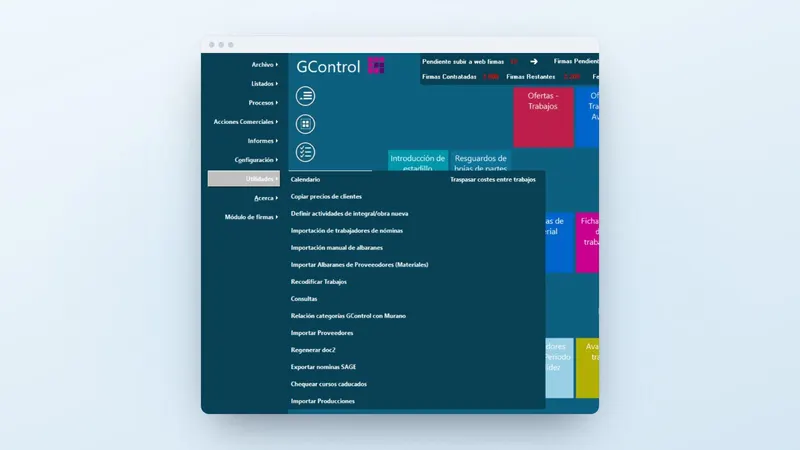
In GControl, from Infonet, reports are managed per worker and per job, and the main screen has crew sheet entry and report sheet receipts close to hand, alongside quotes and jobs.
How the report flows into job costing and payroll
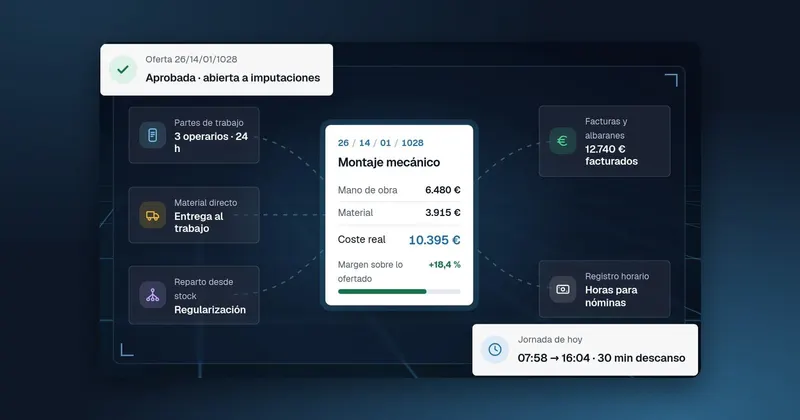
A well-made report is written once and serves for costing, for payroll and for reporting. This is the path in GControl:
- The hours on the report add up to the cost of each job, together with staff and the material delivered.
- The program connects to your company's ERP and imports the delivery notes for each job, so material is not left out of the cost.
- With the month's overtime, public holiday hours, night work and subsistence allowances, it prepares the variables for Sage and spreads the payroll cost across the jobs. It is a link to payroll: payroll is still calculated in Sage.
- The hours, cost and invoicing control reports tell you which job is going well and which is eating into your margin.
So that reports, ERP and payroll are not passed by hand from one program to another, there is more detail in how to connect your company's programs.
If the shutdown reports reach you on paper and someone retypes them for costing and for Sage, GControl captures those reports by worker and job and produces the month's variables from them: call +34 959 54 07 12 or leave us your details and we will call you to go through it with your jobs.
What the report has to do with plant access documentation
The report shows who from your team was at each plant, and the plant asks for its documentation before letting them in. Under Real Decreto 171/2004 (Spanish Royal Decree on coordination of occupational risk prevention), art. 10.2, before starting work the principal company requires the contractor to prove in writing the risk assessment and preventive planning for the contracted works and services, and that it has met its obligations to inform and train workers. Ley 31/1995 (Spanish Occupational Risk Prevention Act), art. 19, adds that preventive training is repeated periodically.
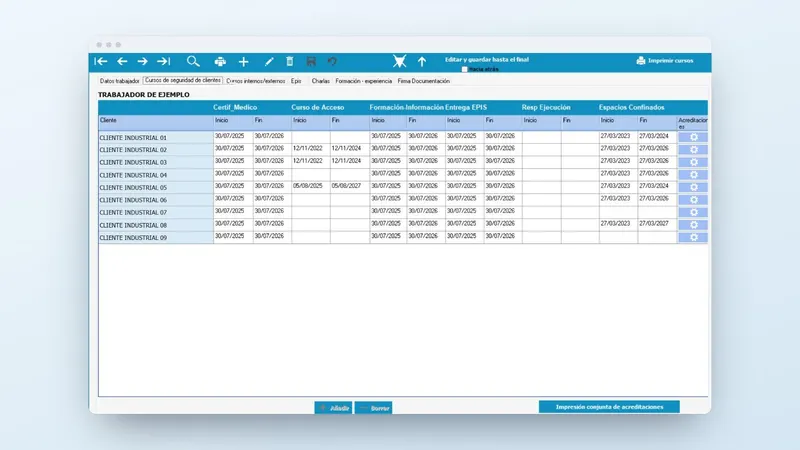
In each worker's record in GControl you can see, plant by plant, the dates of the medical certificate, the access course, training and information, and PPE issue, and from there you print the accreditation in that plant's format. The expired courses alert appears before someone arrives at the gate with an out-of-date course. Prevention remains your company's responsibility; the program helps you keep the paperwork up to date.
Asbestos in the plant: what changes with Real Decreto 847/2026
The BOE (Spain's official state gazette) of 23/10/2026 published Real Decreto 847/2026 on protection against asbestos, which came into force on 24/10/2026. It strengthens work plans, training and respiratory equipment.
If your company is already registered in the Registro de empresas con riesgo por amianto (RERA, Spain's register of companies with asbestos risk), it must apply for renewal within six months of 24/10/2026.
For an installation, maintenance or dismantling contractor there are three things to review: the RERA registration, the training of each exposed worker and the documentation the plant requires before letting them in. The reports tell you who has been on asbestos jobs, and the course record tells you who lacks training or has it about to expire.
What to do this week with your reports
- Take the reports from the last shutdown and count how many lines have no assigned job or are missing allowances and mileage.
- Decide which crews can use a crew sheet and which need a report per worker.
- Check the courses of anyone going into a plant next month, and the asbestos ones if the new royal decree affects you.
If you would like to see your reports, the cost of each job and your people's courses in a single program, call +34 959 54 07 12 or ask us to call you using the form on this page. You can also see what we do for industry at Infonet Consultores.