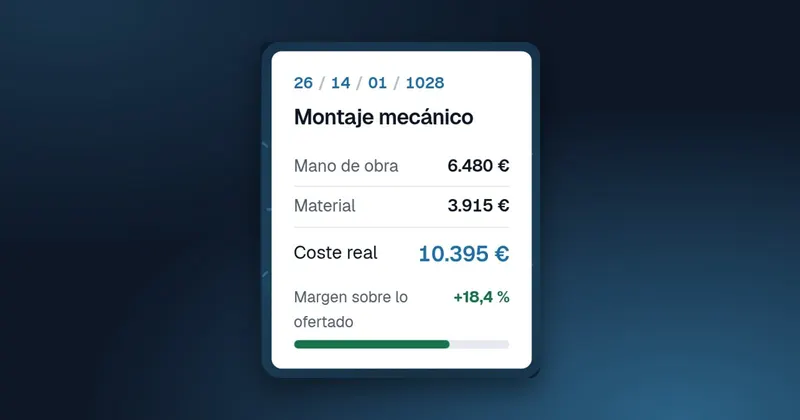
Knowing that a job came in with less margin than planned is useful, but it is not enough. What really helps is knowing where the money went: whether it was the structure, the pipework or commissioning; whether it was hours or materials. To do that, you need to compare quoted and actual figures work package by work package. This article explains how to prepare the quote so that comparison is possible, how to read the variances and what to do with them.
Why compare by work package and not just the total
The total hides offsetting errors. An installation can close at the expected cost because you overran by 30% in one work package and spent far less than you had estimated in another. If you only look at the total, your next quote will repeat both mistakes. If you look by work package, you will know that you need to raise one price and that you may be overcharging on the other, which can cost you tenders.
Comparing by work package is also useful during the job, not just at the end. If halfway through the installation one work package has already used up almost all of its quoted hours, there is still time to react: review the method, talk to the customer if there are changes or, at the very least, know that this job is going to close with a lower margin.
How to prepare the quote so that it can be compared
The comparison is only as good as the structure of the quote. Some guidelines:
- Work packages that match real phases. If the work packages in the quote do not match how the team actually works, nobody will know which one to allocate the hours to.
- Few work packages. Between four and eight is usually enough for an average installation. You can keep more detail in the line items.
- Labour and materials kept separate in each work package, with hours by category where possible.
- The same work packages on similar jobs. That way you can compare across jobs and build up a history.
For example, a mechanical installation might have these work packages: structure; pipework and valves; bolts and consumables; testing and commissioning.
How to allocate actual costs to each work package
For the actual side to have the same breakdown, hours and materials need to arrive with the work package indicated:
- On the work report, the operative states the job and the activity or work package they worked on.
- Materials purchased for the job are assigned to the relevant work package and line item.
- Materials taken from the warehouse for the job are allocated in the same way.
- Changes requested by the customer are opened as a separate work package or as a separate job, so they do not distort the comparison.
If operatives are unsure which work package to allocate a task to, the fault usually lies with the quote, not with them: it means the work packages cannot be told apart in practice. Fix it in your next quotes rather than asking for more precision on the work reports.
That last point matters: if the customer asks for a change and you put it into an existing work package, it will look like an overrun on your part when it is really new work that should be invoiced.
How to read the variances
With both sides prepared, the comparison is just a table. An example with made-up figures:
| Work package | Quoted hours | Actual hours | Quoted materials | Actual materials |
|---|---|---|---|---|
| Structure | 120 | 118 | 1.840 € | 1.910 € |
| Pipework and valves | 140 | 182 | 1.420 € | 1.460 € |
| Bolts and consumables | 20 | 22 | 510 € | 780 € |
| Testing and commissioning | 40 | 36 | 0 € | 0 € |
In this example total hours overrun by 38, but almost all of that comes from the pipework. And on materials, the small work package (consumables) is the one that deviates most in proportion. These are two different questions with different answers.
Questions to ask about each variance
- Was it measured wrongly in the quote, or was it executed worse than planned?
- Was there a customer change that was not recorded as such?
- Were hours lost to waiting or a lack of materials?
- Is the extra material waste, an ordering error or genuinely higher consumption?
Note down the answer alongside the job. A year later, that comment is worth more than the figure.
When to look at the comparison
Don't wait until the close. On long jobs, review the comparison regularly while the job is open: when a work package has used up a share of its quoted hours that does not match how much has been done, it is time to talk to the foreman. When the job closes, do one last full review and record your conclusions. And once a year, pool the jobs of the same type of activity and see whether the variances recur in the same work packages: if they do, the problem lies in how you quote, not in how you execute.
From analysis to the next quote
The comparison is only worthwhile if something changes as a result. Some ways to make use of it:
- Adjust the standard hours per work package using the average of recent similar jobs.
- Review the work packages that always deviate: there may be a line item that nobody quotes for.
- Share the results with the foremen. Knowing how many hours were quoted for each work package helps them organise the work.
- Run the comparison on the jobs that made money too: sometimes a favourable variance means you are quoting too high.
Quoted vs actual in GControl
In GControl, each quoted job carries its quoted labour and associated materials, broken down into the work packages and line items you define. When the quote is approved, the job is opened for cost allocation: workers' work reports, with their hours per job and activity valued using the rate card by professional category, and the materials that arrive through direct purchase, from the warehouse or by delivery, in the categories and line items you set up. To make the most of the information you have listings in Excel pivot tables, from quotes through to costs, income and profit, and a Power BI dashboard.
It is explained in cost per job and, for the materials side, in materials and stock.